Jira
Jira's "Projects" Are Dead: Long Live "Spaces"
Atlassian's major Jira terminology update replaces "Projects" with "Spaces" across all Cloud products. Learn the impact, timeline, and best practices for admins.

The End of an Era: Why "Projects" Had to Go
For over two decades, Jira has used "projects" as its fundamental organizing container. But here's the problem: most teams weren't actually running traditional projects with defined start dates, end dates, and clear deliverables. Instead, they were using these containers for ongoing operational work, continuous delivery pipelines, and business-as-usual activities.
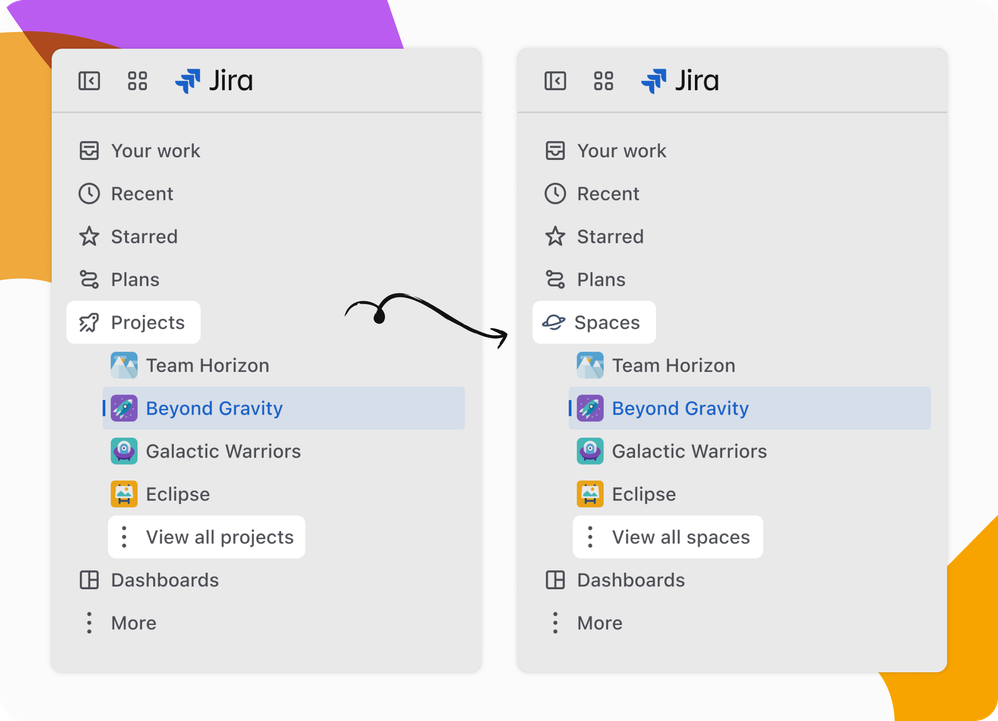
As an Atlassian consultant who's implemented hundreds of Jira instances, I've watched teams struggle with this terminology mismatch. Marketing teams managing ongoing campaigns, IT support handling continuous service requests, and development teams running perpetual product backlogs—none of these fit the traditional "project" definition.
The confusion deepened when Atlassian introduced Atlassian Projects in their broader ecosystem. Suddenly, organizations had two different "project" concepts that served completely different purposes, creating a terminology nightmare for administrators and end users alike.
What's Actually Changing (And What Isn't)
The transition from Jira "projects" to Jira "spaces" is purely cosmetic—but that doesn't make it insignificant. Here's the breakdown:
What's Changing:
- All UI references to "Project" become "Space"
- Project icons updated throughout the interface
- Navigation menus and terminology across Jira Software, Jira Service Management, and Jira Product Discovery
- Documentation and help text updated
What's NOT Changing:
- All existing functionality remains identical
- JQL queries continue working (though terminology updates will roll out separately)
- Permission schemes, workflows, and configurations stay intact
- APIs maintain backward compatibility
- Your data, issue history, and custom fields remain untouched
This is purely a language evolution—think of it as Jira getting a vocabulary update, not a personality transplant.
The Rollout Timeline: What Admins Need to Know
Atlassian is taking a phased approach to avoid overwhelming users:
Phase 1: Free and Standard Plans
September 1 - September 29, 2025 All Free and Standard plan sites will be transitioned automatically
Phase 2: Premium and Enterprise Plans
October 20, 2025 Premium and Enterprise sites begin receiving updates
Phase 3: Complete Rollout
November 10, 2025 All users (except Release Track customers) will see the new terminology
Phase 4: Release Track Sites
December 9, 2025 Organizations on release tracks receive their updates
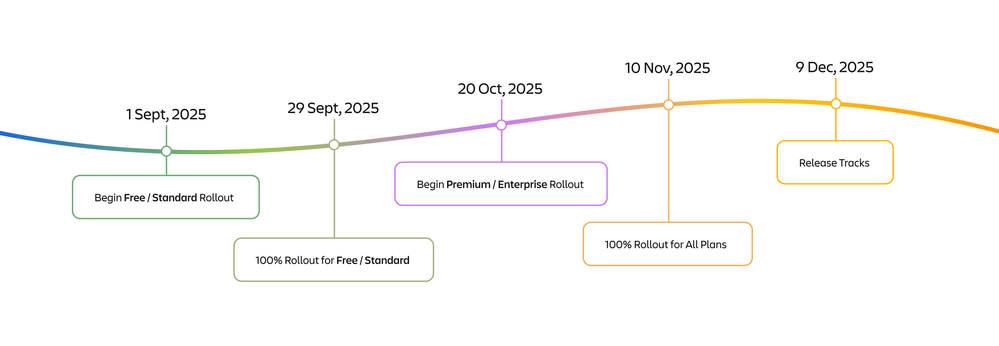
The rollout isn't simultaneous across all interface elements. While most UI changes happen together, JQL terminology updates are scheduled separately and should be completed by mid-December 2025.
Strategic Implications: More Than Just Words
This change signals a broader shift in how Atlassian envisions team collaboration. By aligning Jira with Confluence's existing "Spaces" concept, they're creating a more unified ecosystem.
Ecosystem Alignment Benefits:
- Consistent Mental Models: Teams no longer need to context-switch between "projects" in Jira and "spaces" in Confluence
- Improved Onboarding: New users can apply space concepts across multiple Atlassian products
- Future-Proofing: Sets the foundation for deeper cross-product integration
Organizational Impact:
The terminology change makes Jira more approachable for non-technical teams. Marketing, HR, and operations teams often resist "project management" tools but readily adopt "collaborative spaces".
Preparing Your Organization: Practical Steps
For Jira Administrators
1. Communication Strategy Start communicating the change now, even though rollout may be months away. Create internal documentation explaining:
- What's changing and when
- Why the change benefits your organization
- How existing work won't be disrupted
2. Documentation Audit Review and flag internal documentation that references "projects":
- Training materials and SOPs
- Onboarding guides
- Integration documentation
- Custom workflow descriptions
3. JQL Preparation While existing JQL queries won't break, plan for the terminology transition. Document any saved filters or dashboards that display "project" in their names or descriptions.
4. User Training Preparation Develop talking points for the transition:
- Emphasize that functionality remains identical
- Position it as improved clarity, not additional complexity
- Prepare FAQs addressing common concerns
For Development Teams
1. API Integration Review While APIs maintain backward compatibility, review any custom integrations that parse project-related responses. Future API versions may use "space" terminology.
2. Automation Scripts Audit existing automation rules and scripts that reference "project" in their logic or outputs. While they'll continue working, updating them proactively improves maintainability.
Common Pitfalls and How to Avoid Them
Pitfall 1: Mixed Terminology During Transition
During the rollout period, your instance may show both "project" and "space" terminology simultaneously, particularly with JQL.
Solution: Prepare users for this temporary inconsistency and emphasize that both terms refer to the same concept during transition.
Pitfall 2: User Resistance
Long-time Jira users may resist the change, particularly power users comfortable with existing terminology.
Solution: Focus on benefits rather than defending the change. Emphasize improved cross-team collaboration and ecosystem consistency.
Pitfall 3: Integration Confusion
Third-party apps and integrations may update their terminology at different times, creating inconsistency.
Solution: Reach out to your key Marketplace app vendors to understand their update timelines and communicate any discrepancies to users.
Best Practices for Smooth Transition
1. Leverage the Change for Process Improvement
Use this transition as an opportunity to:
- Review and optimize your space structure
- Consolidate underutilized containers
- Improve naming conventions for better discoverability
- Standardize space configurations across teams
2. Create Change Champions
Identify power users in each department to become "space champions" who can:
- Help colleagues understand the terminology
- Provide localized support during transition
- Gather feedback on any unexpected issues
3. Monitor User Adoption
Track help desk tickets and user questions during the transition period. Common themes can inform additional training or communication needs.
Long-term Strategic Considerations
This terminology change positions Jira for deeper integration with the broader Atlassian ecosystem. Future enhancements will likely leverage this unified "space" concept across products.
Consider how this alignment might influence your:
- Tool Selection: Easier to justify additional Atlassian products when terminology is consistent
- User Training: Simplified onboarding across multiple Atlassian tools
- Governance Models: Consistent space management approaches across Jira and Confluence
The Bottom Line: Evolution, Not Revolution
While some in the community have expressed frustration with this change, it reflects Atlassian's commitment to creating a more intuitive, unified platform. For administrators, this is an opportunity to improve user experience and align with modern collaboration patterns.
The transition requires minimal technical effort but thoughtful change management. Organizations that proactively communicate the benefits and prepare their users will see this as a positive evolution rather than disruptive change.
As Jira continues evolving beyond its origins as a bug tracker, terminology that reflects its true role as a collaborative workspace makes perfect sense. Welcome to the age of Jira Spaces.
👉 Contact me for expert Atlassian consulting
Subscribe for more Atlassian ideas and real-world tips and strategies.
( Atlassian Consulting )
Need tailored Atlassian guidance?
Get expert assistance with custom configurations, Jira Service Management, Cloud migrations, Assets architecture and more.
Contact me →